Porting a raylib game for the andbernic with muos
I have anbernic with muos as system. I've thinked why not use this these machines for something more than emulation, like making games for these kind of machines with portmaster. All this it's done on an Arch, Endeavour OS, on a x86_64, so you'll have to adapt these step to the system you have.
Portmaster
Portmaster is a plataform that provides the instalation of games from other platforms, either with and runtime environment or offering native versions of these games.
For this case I use westonpack, more than anything becuse it seems muos uses the framebuffer /dev/fb0 to draw on screen instead of DRM/KMS as raylib uses. Westonpack is a runtime environment that emulates the graphics stack that is found tipically on a Linux desktop and not on a Linux for embedded.
Building environment preparation
Reading this https://portmaster.games/porting.html you can have your environment for porting games with raylib. In this section I'm going to describe how I've mounted mine.
You need to have installed in your system debootstrap and qemu-user-static-binfmt.
We adapt the steps we need from https://wiki.debian.org/Debootstrap.
> mkdir debian-arm64
> sudo debootstrap --arch=arm64 stable debian-arm64 http://deb.debian.org/debian/
Once finished we do chroot there
> sudo chroot debian-arm64/
If qemu-user-static-binfmt is well installed on the host, on chroot when doing the following
> uname -m
should display
aarch64
Installation and package configuration
Do this on yor terminal, inside chroot
> apt install cmake-curses-gui build-essential libsdl2-dev
Download the source code of the actual version of raylib (for this date) https://github.com/raysan5/raylib/archive/refs/tags/6.0.tar.gz in root, or another part of your chroot environment
Personally for working comfortably in chroot root from host I give it all permissions from my user and group to the root of chroot (no /root from the host). Extract zip and enter in the dir.
> tar -xzf raylib-6.0.tar.gz
> cd raylib-6.0
> ccmake .
Press C key (Configure)
Once finished the initial configuration
We edit these fields until the look like this, we don't delete fields.
- BUILD_EXAMPLES OFF
- OPENGL_VERSION 2.1
- PLATFORM SDL
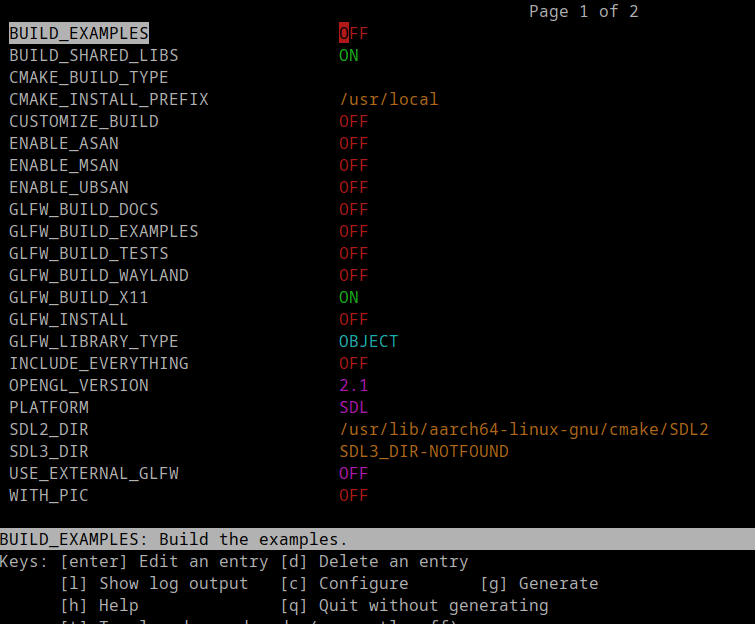
Again, configure, until Generate appears (key G), and press G to generate. Exit and do
> make
> make install
Una vez listo, copia tu juego en una carpeta dentro del chroot y cuando lo compiles añades estas bibliotecas mas las que tengas Once done, copy your game into a dir inside chroot and when you compile add these libraries
-ldrm -lgbm -lEGL -lGL
Westonpack
Follow the instructions from https://github.com/binarycounter/Westonpack/wiki/SDL2-on-X11-Example#running-sdl2-games-that-require-x11.
And copy and adapt this script https://github.com/binarycounter/Westonpack/wiki/SDL2-on-X11-Example#example-script-opengl-2 for your port.
At least changing the names is enough. Rename the script to the name of your port.
Packaging for testing
The port structure would be
port
├── game-name
│   ├── assets
│   │   ├── whatever
│   │
│   ├── libs.aarch64    Put all your libraries you game uses here
│   │   └── libraylib.so.600    This if you has compiled raydlib as a dynamic lib
│   ├── game-name.aarch64
│   └── x11sdllib
│       └── libSDL2-2.0.so.0
└── game-name.sh
Uploading to your little machine
Use scp or sftp to upload the port to your machine for testing
Copy /port/nombre-juego to ports/nombre-juego Copy /port/nombre-juego.sh to ROMS/Ports/nombre-juego.sh
Portmaster here tells about to kill the UI to test the game from terminal, with the last steps we can keep the user interface and test the game as if it were downloaded from Portmaster.
This structure is for testing purposes only, for packaging for portmaster is necessary metadata files.
This is all for the moment, for any aclaration or details please contact me.